
Jewelry Retail Analytics Demo
Full-featured jewelry retail analytics and AI demo — forecasting, inventory, marketing, purchase assistant with approval workflow, ML monitoring, and Excel-driven KPIs.
- React 18
- TypeScript
- Vite
- shadcn/ui
- TanStack Query
- Recharts
- FastAPI
- SQLAlchemy
- pandas
- Groq AI
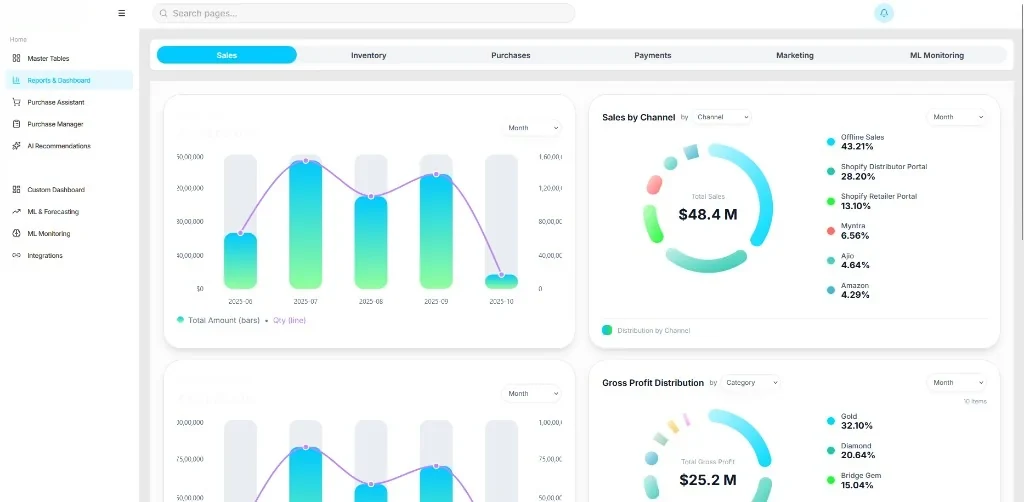
Reports & Dashboard — Sales analytics
01
Problem
Jewelry businesses needed a compelling demo showcasing AI forecasting, inventory intelligence, and analytics capabilities for sales and investor presentations.
02
Solution
Built a client-facing analytics demo with multi-pillar analytics dashboard, ML forecasting, purchase assistant with approval workflow, Excel import/export hooks, and an AI assistant chat.
03
Architecture
React 18 + TypeScript + Vite + shadcn/Radix UI frontend with TanStack Query. FastAPI backend with SQLAlchemy, pandas, Groq AI, and Parquet data storage.
04
Business impact
Demonstrates the product's capabilities for jewelry retail analytics, forecasting, and AI-driven decision support.
Decisions
Technical decisions
- 01FastAPI + Parquet for performant analytics data serving
- 02TanStack Query for dashboard data fetching and caching
- 03shadcn/ui for consistent demo UI components
Features
Feature breakdown
- Analytics Dashboard
- ML Forecasting
- Purchase Assistant
- Inventory Module
- Marketing Analytics
- AI Assistant Chat
- Excel Hooks
Responsibilities
- Built multi-pillar analytics dashboard with forecasting and inventory modules
- Implemented purchase assistant with approval workflow UI patterns
- Developed Excel import/export hooks and ML model accuracy monitoring
- Integrated an AI assistant chat and marketing analytics views
Challenges
- Balancing demo richness with maintainable mock/real data pipelines
- Integrating ML forecasting visuals with Excel-driven KPI data sources
Performance considerations
- Parquet columnar storage for analytics queries
- TanStack Query caching for dashboard widgets
Lessons learned
- Demo platforms need clear separation between showcase data and production APIs
- Approval workflow UI patterns reuse well across analytics and operational modules
Related engineering library